
Reference / P009
lily's world XD Websites
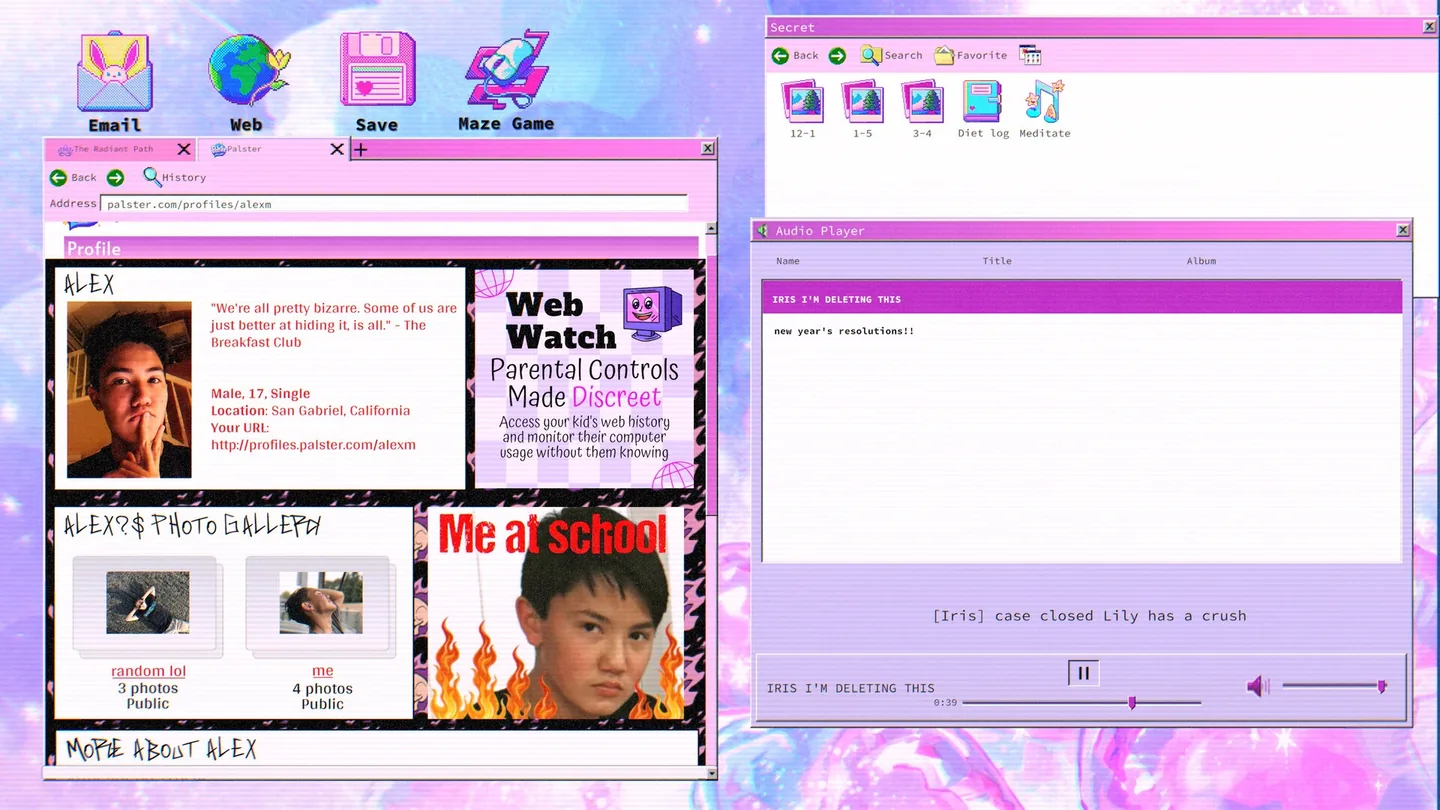
The in-game web is a period recreation of the mid-2000s internet: social profiles, forums, search engines, an archive and a handful of organisation pages. This directory lists the sites the investigation sends you to, what each one is for, and the point in the story where it opens up. Puzzle answers stay on their own pages.
Quick answer
Four sites carry the main route: Lily's World for the blog, Palster for the early social profile, Seclink for the encrypted chat, and the Radiant Path site for everything about the organisation. Around them sit the period extras the puzzles route through, including two forums, a lost-web archive, a video site, a photo app and several separate lookup tools. Every one of them exists only inside the game.
- Steam release for Windows, 17 September 2026, plus the 2026 demo build, which carries a smaller version of the same web.
- No official or third-party page publishes a complete site list, so this directory is assembled from walkthroughs and may not be exhaustive. Where a name is documented only once, the entry says so.
- Names and roles only. This page does not carry password answers, and it makes no claim about how many sites exist in total.
What the in-game web actually is
A browser window inside the game renders a fictional early-2000s internet, and the investigation runs through it. Knowing which site does what is the fastest way to stop guessing at a puzzle.
The browser is a desktop app, and it behaves like one: you type an address, you follow links, and pages can carry links that are easy to miss because they sit in a styled footer or behind a colour change. Two layers sit inside it. The first is the web pages themselves; the second is the set of desktop apps that never leave the machine, such as the mail client, the messenger, the journal and the monitoring tools.
Radiant Path pages and organisation sites
The organisation's own site is several pages deep, and most of the second half of the game runs through it.
| Page or site | What it is | When it becomes relevant |
|---|---|---|
| The Radiant Path | The organisation's main site, carrying a flyer and a link to its feed account | Mid-game onward. The flyer is where the link to the feed account is printed, at the very bottom. |
| Members Area | A login-walled section of the Radiant Path site | Late. It needs a member login, and one walkthrough records the forgot-password route as an alternative way in. |
| Divine Leaders and Resources | Internal pages describing the organisation's figures and its material | Late, once you are inside the members section and reading around it. |
| Radiant Retreat | A page about one of the organisation's events | Mid-to-late, as the story ties that event to a real location and to a business listing. |
| Commune | A members-only area of the site with its own knowledge check | Late. Reaching it depends on the members login and on details gathered earlier. |
| Ohio Site | A section covering the organisation's activity in one state | Late, immediately after the commune check, and it is the step before the Incident Report. |
| Incident Report | The late-game form that asks for two identifier fields | Late, after the Ohio site. Its fields are covered on the Incident Report page. |
| Recent Ex-Members | A page listing people who have left the organisation | Late, when cross-checking names you have already met. |
| Hope Therapy Center | A clinic site with a team page | Mid-game, when a name from elsewhere needs confirming against a staff list. |
| Oberon Plastic Surgery | A practice site with a visiting-card image | Mid-game. The activation code for one login is printed on the card image rather than written in the text. |
| Bizsearchonline | A business-registry lookup | Mid-game, when you need to see which names an organisation trades under. |
| Seekle | A search-results page reached by following a link rather than typing an address | Mid-game, as a stepping stone between the registry and the next address. |
| Upgig | A job board | Mid-game, where a posting ties a person to an organisation. |
Lookup and utility pages
The smaller tools that exist to turn one piece of information into the next. Several are single-purpose and one page deep.
| Site | What it is | Practical note |
|---|---|---|
| Medboard | A physician-licence lookup | Enter the licence exactly as printed, separators included. Dropping a dash can fail the search. |
| findrealpeople.com | A people-search engine | Search the initials-and-surname form you were given, then narrow the results down. |
| CallNow | A phone-calling site | Used to dial a number and reach a voicemail. It is the only place the call happens. |
| Seclink | An encrypted messaging service | Behind an eight-digit code. The late-game fork happens inside a conversation here. |
| findthisiris.com | A small download page printed on an image | Documented by one source only, so treat the spelling as unconfirmed. |
| lilybfftest.com | The personality-test link used to recover an account | Also documented by one source only. The test itself is the memorable part, not the address. |
Desktop apps that are not websites
These never load in the browser, and two of them only appear after the story changes the machine.
- Email, with inbox, drafts and sent folders; the sent folder matters more than most players expect.
- Messenger, holding the long conversation with Iris.
- Audio, where recordings sit, including one named after a person.
- Journal, with dated entries, one of which carries a link you need.
- Web, the browser itself, and the app that everything in this directory runs inside.
- Web Watch, a monitoring tool that keeps flagged history and blocked-site records.
- Recovered Files, which appears after the computer resets and gathers the monitoring data back up.
- Notes, which holds a code after the reset that it did not hold before.
- Gallery and Calculator, both used at least once as puzzle furniture rather than as decoration.
- Dress Up Game, Maze Game and one long-form interactive story, which are the three game-like apps on the desktop.
The desktop changes over the course of the story, so an app that is missing early is usually a state you have not reached rather than a bug. Notes in particular is worth reopening after the reset, because the code it gains is easy to miss if you only looked at it once at the start.
When the browser fights back
A few known annoyances around the browser, and what is and is not known about each.
- The website window can stick to the top of the screen and cover the Study Guide, Music and Save icons. There is no official fix; guides covering it decline to hand out save-resetting steps, and closing and reopening the window is the usual first attempt.
- A page that should show a link sometimes needs a new tab before the path to the blog appears. This is reported rather than documented, so treat it as something to try when a route looks empty.
- Spelling matters more than it should. The organisation's site is Palster in game, and the misspellings Palaster and Plaster both circulate in player posts; if a search fails, compare your typing against the in-game page rather than against a forum.
Social sites, forums and archives
These carry the human side of the story: what Lily posted, what other people said back, and what the web kept after she stopped writing.